
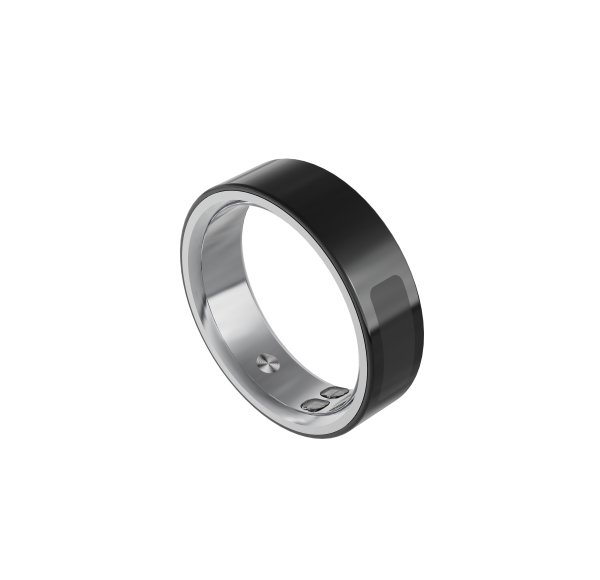
What Pairing aiRing Ultra with aiCare Actually Involves
Pairing aiRing Ultra with aiCare is the setup step that connects AIHNET's ring-style wearable to AIHNET's connected-health software service. In the confirmed documentation, the workflow is straightforward: the ring is activated on a powered charging dock, and then it pairs with aiCare through Bluetooth. The manual states Bluetooth LE 5.0 communication for the ring, and AIHNET states that aiRing Ultra synchronizes data with its mobile application. Pairing is what lets the ring's data reach that experience.
At a general level, pairing is about establishing the connection between the wearable and the app, not about interpreting what any reading means. The confirmed documentation supports the activation-then-Bluetooth sequence and the existence of the aiCare mobile application on iOS and Android. It does not confirm the exact product transport modes, the exact automatic-sync matrix, or specific OS-version compatibility. That means this guide sticks to the confirmed workflow and avoids implying automatic background synchronization, reconnection behavior, universal phone support, or particular operating-system versions.
Before You Start: Confirmed Setup Prerequisites
The confirmed documentation points to a small set of things to have in place before pairing. First, a powered charging dock is used to activate the ring. Second, the aiCare mobile application is the software side of the pairing; iOS and Android app existence is confirmed, while exact OS-version compatibility is not. Third, the manual states a Bluetooth LE 5.0 connection path, which is the communication method described for pairing aiRing with aiCare after activation on the dock.
It is worth setting expectations accurately here. The documentation confirms the activation-and-pairing sequence and the BLE 5.0 communication statement, but it does not confirm automatic or background synchronization, reconnection behavior, universal phone support, exact OS compatibility, Bluetooth profile detail beyond BLE 5.0, encryption, or security certification. This guide does not promise a procedure beyond what the manual confirms.
Confirmed aiRing Ultra Specifications Relevant to Setup
The confirmed manual specifications below are the ones most relevant when preparing the ring for pairing and daily wear. They are presented as stated, with their limitations noted afterward.
The manual also states that the product is non-medical equipment and that its data and information are for reference only. Actual battery life can vary and is not a guarantee. The 5ATM rating should not be read as a universal waterproof or safety guarantee. The listed specifications do not establish sensor accuracy, continuous measurement behavior, or comparative superiority over other devices.
| Specification | Confirmed detail |
|---|---|
| Material | Stainless steel |
| Communication | Bluetooth LE 5.0 |
| Listed sensors | Temperature, acceleration, heart-rate, blood-oxygen, ECG, BIA |
| Stated battery life | 4-6 days |
| Charging | Magnetic charging; charging time no more than 1.5 hours |
| Water resistance | 5ATM rating |
| Operating temperature | -20 C to 50 C |
| Storage temperature | -30 C to 70 C |
| Charging temperature | 0 C to 40 C |
| Product status | Non-medical equipment; data and information for reference only |
The Confirmed Pairing Workflow, Step by Step
The manual confirms a short order of operations. The steps below stay at the level the documentation supports and do not invent app screens, menu names, or timing.
This workflow is scoped to aiRing Ultra in this intake. The manual does not print Lite or Ultra, so this sequence should not be reused as a description of aiRing Lite. The documentation also does not confirm automatic background sync, exact OS versions, universal phone compatibility, reconnection behavior, or security properties, and this guide does not claim guaranteed connectivity.
Confirmed pairing sequence
- Activate the ring on a powered charging dock The manual describes activating the ring on a powered charging dock as the first part of the confirmed workflow. The manual states magnetic charging and a charging time of no more than 1.5 hours.
- Pair aiRing with aiCare through Bluetooth After activation, the manual describes pairing aiRing with aiCare through Bluetooth. The manual states Bluetooth LE 5.0 communication.
Wearing the Ring Correctly After Pairing
Once pairing is complete, the confirmed wear instruction is specific: the manual instructs users to wear the ring with its sensor positioned on the back of the finger. This is the documented placement guidance, and it is the only wear instruction this guide treats as confirmed.
The documentation does not support additional fit, comfort, or sizing claims beyond what is confirmed. This article does not claim that aiRing Ultra is more comfortable than wrist-worn devices, and it does not claim guaranteed safety, irritation prevention, pressure reduction, or improved sleep. For sizing and fit questions, the confirmed product documentation and support channels are the appropriate references.
What the Documentation Does Not Confirm About Pairing and Sync
An honest boundary section helps readers avoid over-reading the confirmed pairing workflow. The supplied documentation does not establish exact product transport modes, the exact automatic-sync matrix, OS-version compatibility, or privacy, security, and regulatory documentation. It also does not establish SOS routing, delivery mechanism, recipients, connectivity prerequisites, or response behavior, and it does not establish Smart Touch compatibility across phones, operating systems, and third-party apps.
Because of those gaps, this guide does not infer automatic background sync, exact OS versions, universal phone compatibility, reconnection, or security properties. It also does not claim regulatory approval, clearance, certification, or medical-device status. Where a reader needs a detail that is not confirmed here, the exact product documentation or support is the right place to check.
How Pairing Fits into an Everyday Monitoring Routine
At a general, non-clinical level, pairing is what connects the ring to the software experience. AIHNET states that aiRing Ultra synchronizes data with the AIHNET mobile application, and aiCare is AIHNET's connected-health software platform. This article describes that connection only at a general level; it does not interpret any reading.
Pairing does not turn a monitoring capability into medical guidance. This guide does not provide individualized medical advice, does not recommend an action based on a measurement result, and does not infer diagnosis, treatment, dosing, clinical efficacy, safety, or accuracy outcomes from a monitoring capability. Readers with medical questions should consult a qualified clinician. For a broader look at how the ring fits into a routine, see the related overview of aiRing Ultra and everyday monitoring.
Frequently Asked Questions
Does aiRing Ultra pair with aiCare through Bluetooth?
Yes. The confirmed manual describes pairing aiRing with aiCare through Bluetooth after activating the ring on a powered charging dock, and the manual states Bluetooth LE 5.0 communication. The documentation does not add Bluetooth profile detail beyond BLE 5.0, and it does not confirm automatic background sync, reconnection behavior, universal phone support, or exact OS compatibility.
Do I need the charging dock to pair aiRing Ultra?
The confirmed manual workflow describes activating the ring on a powered charging dock before pairing through Bluetooth. The manual states magnetic charging and a charging time of no more than 1.5 hours. The charging accessory form is variant-dependent, so this guide does not claim a specific charging accessory form is confirmed for every retail unit.
Which phones or operating systems are compatible with the aiCare app?
iOS and Android app existence is confirmed, but exact OS-version compatibility is not confirmed. This guide does not claim universal phone support, specific OS versions, or security and privacy properties. For current requirements, check the app listing rather than relying on an invented specification.
How should I wear aiRing Ultra after pairing?
The manual instructs users to wear the ring with its sensor positioned on the back of the finger. This guide does not claim comparative comfort against wrist-worn devices, and it does not claim guaranteed safety, irritation prevention, pressure reduction, or improved sleep.
Does pairing mean my data syncs automatically in the background?
The confirmed evidence supports a Bluetooth pairing workflow, but it does not confirm the exact automatic-sync matrix or automatic background synchronization. This guide does not infer reconnection behavior, guaranteed connectivity, or continuous measurement behavior. The supported answer is limited to what the documentation confirms.
Is aiRing Ultra a medical device, and can pairing help me diagnose a condition?
The manual describes the product as non-medical equipment and its data and information as for reference only. This guide does not claim diagnosis, treatment, individualized medical advice, medical accuracy, clinical efficacy, disease detection, or improved health outcomes, and it does not suggest changing medication based on any reading. For medical questions, consult a qualified clinician.
Does the SOS feature work through the aiCare pairing?
aiRing Ultra supports an implemented SOS alert feature, and SOS and Smart Touch are confirmed Ultra-only capabilities compared with aiRing Lite. The supplied evidence does not establish SOS routing, delivery mechanism, recipients, connectivity prerequisites, or response behavior, so this guide does not claim automatic emergency-service contact, guaranteed alert delivery, medical monitoring, or precise recipients. SOS is not a substitute for emergency services.