
What Caregivers Should Compare Before Buying a Glucose Meter for a Parent
A useful way to start is to write down what a typical testing moment looks like in your family: who is present, where supplies are kept, and what happens to the result afterward. That description will tell you which usability details matter most and which supply routine is realistic. If you are new to home monitoring, our overview of how a meter fits into an everyday testing routine is a helpful companion read before you compare specific devices.
Usability Questions to Ask About the Meter Itself
Ask about sample size, time to result, whether the meter requires coding, how readable the display is, and how many results the device stores. Smaller sample sizes and shorter result times can matter for someone who finds finger-sticks uncomfortable or tiring, while display readability and stored-result capacity matter for whoever reviews the readings later.
aiGlucoCare offers a worked example of what confirmed specifications look like: no-code operation, a stated result time of approximately five seconds, a stated sample volume of 0.7 microliters, a stated measurement range of 1.1–33.3 mmol/L, and storage of up to 500 results. These are the manufacturer's stated figures for this model. They are not a promise that the meter will suit every person, and they do not establish features such as a large display or voice output, which are not confirmed for this product. Compare any meter against its own manual rather than assuming shared features.
| Check | Why it matters for a caregiver |
|---|---|
| Sample size | A smaller drop may be easier for someone with limited hand strength or circulation |
| Time to result | Shorter waits can make a testing routine less tiring |
| Coding required | No-code operation removes a setup step that can be missed |
| Display readability | Whoever reads the result needs to see it clearly |
| Stored results | Affects how much history is available on the device itself |
Confirmed aiGlucoCare Specifications at a Glance
If you are considering aiGlucoCare, it helps to see the confirmed specifications in one place. The table below lists only facts confirmed for this product. Manufacturer-stated ranges are quoted as stated and are not a guarantee of accuracy for every user or situation.
| Specification | Confirmed detail |
|---|---|
| Product name | aiGlucoCare |
| Manufacturer model | Bioland G-427B |
| Sample type | Fresh capillary whole blood |
| Sample volume | 0.7 microliters (stated) |
| Time to result | Approximately five seconds (stated) |
| Coding | No-code operation |
| Measurement range | 1.1–33.3 mmol/L (stated) |
| Stored results | Up to 500 results |
| Connectivity | Connects with aiCare through Bluetooth for supported blood-glucose data workflows |
Planning Test Strips and Supplies Around Real Caregiving Routines
Testing frequency comes first, because it drives everything else — and that frequency is a plan to confirm with the clinician rather than something to estimate from a meter's packaging. Once you know the expected rhythm, you can decide who checks the supply level, where a backup box lives, and how the household avoids both running out mid-week and letting strips expire unused.
Keep this as a planning framework rather than a purchasing promise. Prices, subscription terms, and availability can change, so verify current strip and supply details on the aiGlucoCare product page before you finalize a routine.
A simple restock routine
- Confirm the testing plan Ask the clinician how often testing is expected, then treat that as the baseline for supply planning.
- Name a restocker Agree who checks the strip supply and when, so it does not depend on memory during a busy week.
- Choose one storage spot Keep strips where they are easy to reach and stored as the meter manual directs.
- Check expiry and matching Before opening a new box, confirm the strips are in date and intended for this meter.
Keeping Glucose Records That Are Useful at the Next Appointment
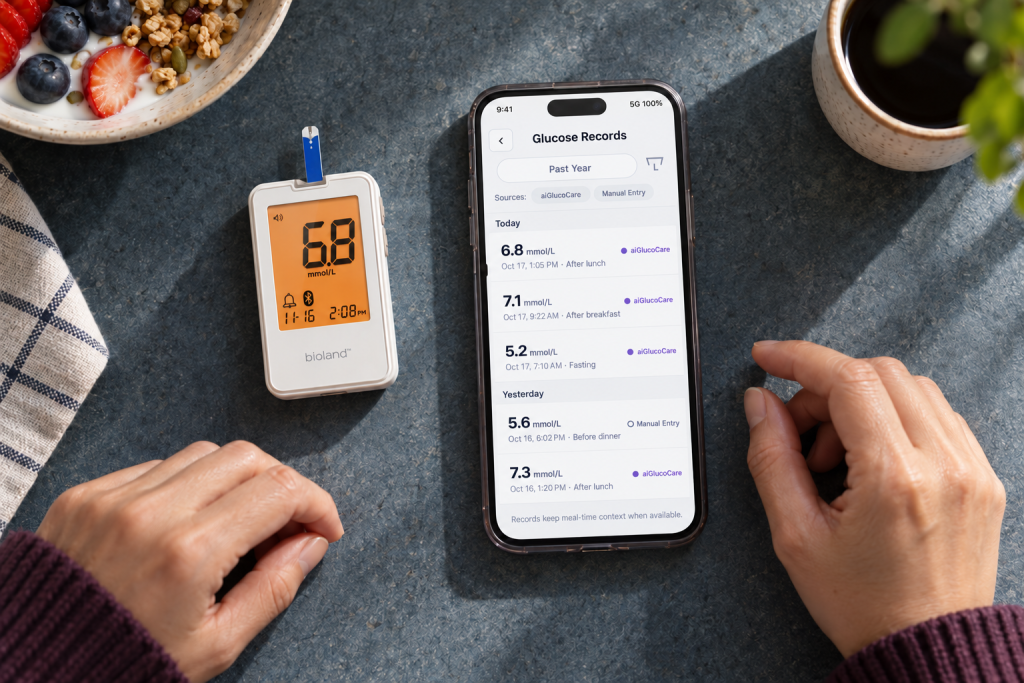
For the next appointment, agree with your parent which readings to bring and who will prepare the record. aiGlucoCare stores up to 500 results and connects with aiCare through Bluetooth for supported blood-glucose workflows. Ask the clinician how they would like to receive the record and who should contact the office if you have a question.
How aiGlucoCare Fits Into a Shared Caregiving Setup
If more than one family member helps, assign each handoff. For example, your parent may use the meter, an in-person helper may check the supply of strips, and another family member may help prepare the agreed record for the next appointment.
Decide who will prepare the record, how your parent wants to share it, and which backup helper to contact. Check the instructions for the exact meter and app before relying on any sharing feature.
A Short Pre-Purchase Checklist for Caregivers
Before you finalize a meter choice, run through the same three areas this guide opened with. The checklist below consolidates them into a single pass.
Caregiver pre-purchase checklist
- Confirm the testing plan Ask the clinician whether and how often your parent should test before comparing devices.
- Check the manual Verify sample size, time to result, coding, and display readability for the specific meter.
- Verify supplies Check current strip and supply details on the product page rather than relying on memory.
- Agree on records and restocking Decide who records readings, who restocks strips, and which record format the care team prefers.
Frequently Asked Questions
Is aiGlucoCare a good meter for an older parent?
Suitability depends on the individual's hands, eyesight, and routine, so the honest answer is that you should compare the confirmed facts against your parent's needs. For aiGlucoCare those facts are no-code operation, a stated result time of approximately five seconds, a stated 0.7 microliter sample, a stated range of 1.1–33.3 mmol/L, and storage of up to 500 results. Check the user manual for the details that matter most to your family; the supplied product information does not confirm suitability for older adults, and features such as a large display or voice output are not confirmed.
Do I need to code the meter before testing?
aiGlucoCare uses no-code operation, so no manual coding step is described for this model. Meters differ, though, and the user manual governs operation for any specific device.
How many results can the meter store, and what happens after that?
aiGlucoCare stores up to 500 results. What happens once that capacity is reached — such as overwrite behavior, deletion order, or retention guarantees — is not confirmed, so review the manual for that detail and, where supported, review readings in aiCare.
Does aiGlucoCare send readings to aiCare automatically?
Automatic synchronization is not confirmed by the supplied product information. What is confirmed is that aiGlucoCare connects with aiCare through Bluetooth for supported blood-glucose data workflows.
Can I use the readings to change my parent's medication?
No — medication and care-plan changes are decisions for the clinician. The meter supports measurement and record-keeping, and those records can be brought to the care team, but this guide cannot interpret a specific reading or give thresholds for action.
What should a glucose log include for the doctor's visit?
Record the reading with the date and time, plus context such as food, activity, and stress — the ADA notes that logging results and noting influencing factors helps the care team see the response to the care plan. aiGlucoCare stores up to 500 results and can connect with aiCare for supported review, but interpretation belongs to the clinician.
How should we plan test strip supplies?
Start with the testing frequency your clinician confirms, then decide who restocks, store strips as the meter manual directs, and check expiry and strip-to-meter matching before opening a new box. Prices, subscription terms, and availability are not stated here — verify current supply details on the product page.
References
- Diabetes Tests | ADA — diabetes.org