
How Readings Move from the aiBP Lite Monitor to the aiCare App
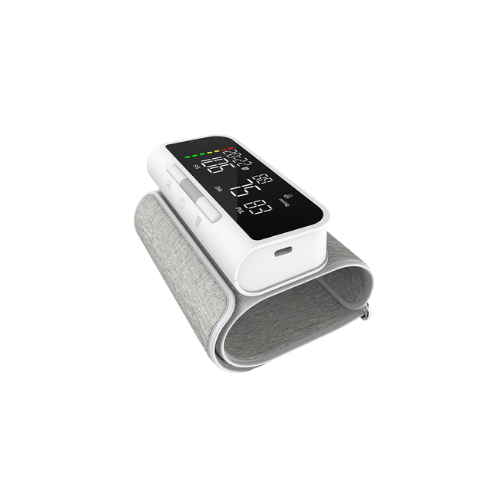
When people ask when and how blood pressure readings transfer from a monitor to an app, they usually want to know two things: what actually moves between the devices, and when that movement happens. For aiBP Lite, the confirmed answer is straightforward but deliberately limited. aiBP Lite is an upper-arm blood pressure monitor that measures systolic pressure, diastolic pressure, and pulse rate. It connects with aiCare, AIHNET's connected-health software platform, through Bluetooth for supported blood-pressure data workflows. In plain terms, transfer refers to moving a stored reading from the monitor into the aiCare app so it can be organized and viewed alongside other supported health data.
It is important to separate this data-handling step from medical interpretation. Transferring a reading into an app is not the same as diagnosing a condition, evaluating a result, or recommending a treatment. aiCare receives, organizes, and presents supported connected health data from compatible AIHNET devices, including blood pressure, but it does not diagnose, treat, or provide individualized medical advice. The app is designed to help users keep a personal record, not to replace a clinician's judgment.
The "when" part of the question is where the confirmed information becomes more limited. The exact transfer timing, whether transfer starts automatically or manually, and how the app behaves in the background are not confirmed in the available product information. Readers should not assume that a reading appears instantly, that synchronization happens automatically, or that the app reconnects on its own. The confirmed fact is only that aiBP Lite connects with aiCare through Bluetooth for supported blood-pressure data workflows. Everything beyond that connection fact should be treated as unconfirmed until it appears in current product or app documentation.
Confirmed aiBP Lite and aiCare Connection Facts
The table below gathers the confirmed connection and device facts in one place. It is intended to help readers separate what is known from what is not yet confirmed about transfer behavior. Only the facts listed here should be relied on when planning an everyday monitoring routine.
| Item | Confirmed detail |
|---|---|
| Product name | aiBP Lite |
| Measurement type | Upper-arm blood pressure monitor |
| Measurements | Systolic pressure, diastolic pressure, and pulse rate |
| User profiles | Two stored user profiles, with 120 memories each |
| Guest mode | Guest measurement mode without memory |
| App connection | Connects with aiCare through Bluetooth for supported blood-pressure data workflows |
| aiCare role | Receives, organizes, and presents supported connected health data from compatible AIHNET devices |
The Confirmed Workflow from Measurement to App
The confirmed workflow is intentionally simple. A person measures blood pressure at the upper arm with aiBP Lite, the reading is stored on the device under one of the two user profiles or in guest mode, and the monitor connects with aiCare through Bluetooth for supported blood-pressure data workflows. This is the sequence that the available product information supports.
What the confirmed workflow does not include is equally important. It does not promise automatic transfer, background synchronization, or a specific number of steps between taking a measurement and seeing it in the app. The exact transfer timing and whether transfer is initiated automatically or manually are not confirmed. Readers who need those operational details should check the current device manual and app documentation rather than assume a particular behavior.
Confirmed steps in the aiBP Lite to aiCare workflow
- Measure at the upper arm Use aiBP Lite to measure systolic pressure, diastolic pressure, and pulse rate at the upper arm.
- Store the reading on the device The reading is stored under one of the two user profiles, or taken in guest mode without memory.
- Connect with aiCare through Bluetooth aiBP Lite connects with aiCare through Bluetooth for supported blood-pressure data workflows. Exact transfer timing and automatic versus manual initiation are not confirmed.
When Transfer Timing Is Confirmed and When It Is Not
The question of when a reading transfers is the part of this topic with the clearest boundary. The available product information confirms that aiBP Lite connects with aiCare through Bluetooth for supported blood-pressure data workflows. It does not confirm the exact transfer timing, automatic versus manual initiation, background sync, or reconnection behavior.
That means readers should not assume a reading appears instantly or automatically after a measurement. It also means no specific delay, interval, or trigger should be treated as a product fact. If timing matters for a particular routine, the reliable next step is to consult the current app and device documentation, which reflects the most up-to-date behavior.
How Stored Profiles and Guest Mode Affect Transfer
aiBP Lite supports two stored user profiles, each with 120 memories, and a guest measurement mode without memory. This distinction matters for transfer because guest readings are not stored on the device. Since they are not part of the device's stored-profile data, they are not part of the confirmed stored-profile transfer workflow.
For the two stored profiles, the confirmed fact is that aiCare receives, organizes, and presents supported connected health data from compatible AIHNET devices. The available information does not confirm how aiCare labels, groups, or shares profile data beyond that general role. Readers should avoid assuming that profile separation in the app works in a specific way until it is documented.
What the aiCare App Does with Transferred Readings
Once supported readings are part of the aiCare experience, the app's confirmed role is to receive, organize, and present connected health data from compatible AIHNET devices. For blood pressure, that means the app can serve as a place to keep supported readings, history, and trends together with other supported health information.
aiCare is a connected-health software service, not a diagnostic tool. It does not diagnose, treat, or provide individualized medical advice, and the available information does not confirm interpretation, alerts, or clinical decision support. Readers should treat the app as a way to organize their own records and discuss any questions or concerns with a qualified healthcare professional.
What Is Not Confirmed About Transfer and Compatibility
Several technical details are not confirmed in the available product information and should not be assumed. These include the Bluetooth profile or version, automatic or background sync, reconnection behavior, universal phone support, exact operating-system compatibility, Wi-Fi protocol, and other technical integration details.
aiCare has iOS and Android mobile applications, but exact OS-version compatibility is not confirmed. Readers should check current app store information for compatibility details rather than infer support from a general platform statement. Similarly, no safety, accuracy, efficacy, or compatibility conclusion should be drawn from a specification that does not directly state it.
How This Fits into an Everyday Monitoring Routine
Home blood pressure monitoring is a self-monitoring practice that can be incorporated into care for people with hypertension, and it is recommended by major guidelines. Research summarized in a peer-reviewed review notes that home monitoring can provide multiple readings over time, is reproducible, and can support risk assessment when used appropriately. Organizing supported readings in an app can help a person keep a personal record over time, which may make it easier to review patterns with a clinician.[source]
This article does not provide individualized targets, treatment instructions, or advice to change medication. Readers should not change medication based on readings from aiBP Lite or the aiCare app. Any decisions about blood pressure management belong with a qualified healthcare professional. For readers who want to go deeper into the confirmed product details, the aiBP Lite FAQ covers confirmed capabilities and everyday use.
Frequently Asked Questions
Does aiBP Lite automatically send readings to the aiCare app?
Automatic synchronization is not confirmed by the available product information. The confirmed fact is that aiBP Lite connects with aiCare through Bluetooth for supported blood-pressure data workflows. Whether transfer is automatic or manual is not confirmed, so readers should not assume automatic sending.
How long does it take for a reading to appear in the app?
Exact transfer timing is not confirmed in the available product information. No duration or instant-transfer promise should be assumed. Readers should refer to the current app and device documentation for the most up-to-date behavior.
Can guest-mode readings transfer to the aiCare app?
Guest mode is a measurement mode without memory, so guest readings are not stored on the device. The confirmed stored-profile transfer workflow applies to the two user profiles. The available information does not confirm how aiCare handles guest readings beyond that.
Which phones and operating systems are compatible with aiCare?
aiCare has iOS and Android mobile applications, but exact OS-version compatibility is not confirmed. Specific phone models and OS versions should not be assumed. Readers should check current app store information for compatibility details.
Does the aiCare app interpret my blood pressure readings?
aiCare receives, organizes, and presents supported connected health data from compatible AIHNET devices. It does not diagnose, treat, or provide individualized medical advice. Readers should discuss readings and any concerns with a qualified healthcare professional.
Can I use the transferred readings to change my medication?
No. Readers should not change medication based on readings from aiBP Lite or the aiCare app. Medication decisions require a qualified healthcare professional. This article does not provide dosing or treatment guidance.
References
- Home Blood Pressure Monitoring – PMC — pmc.ncbi.nlm.nih.gov