
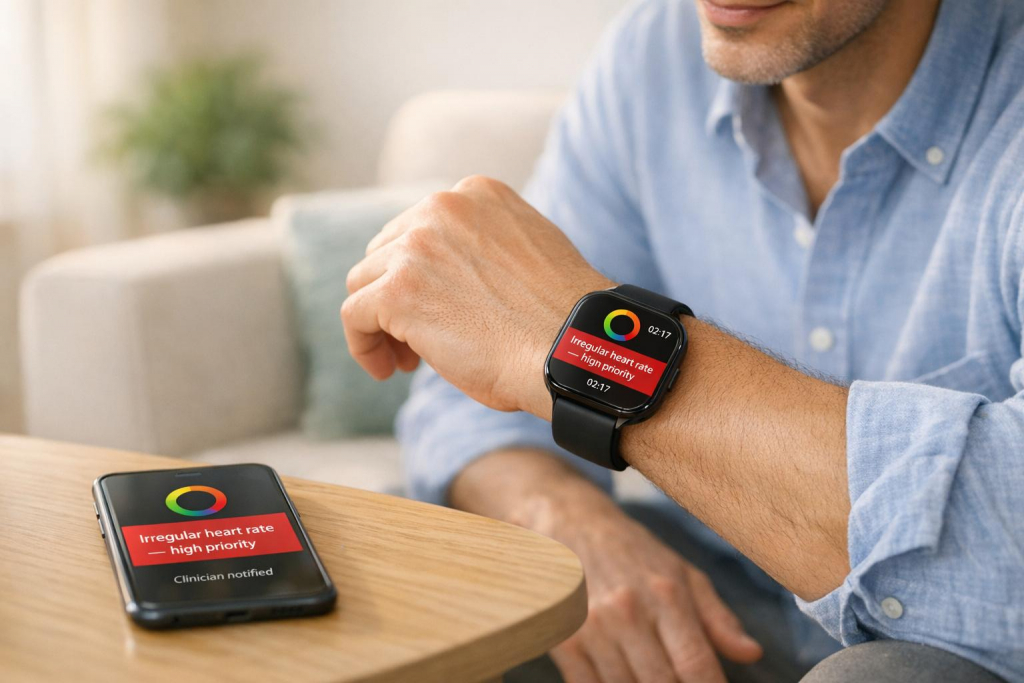
Real-time alerts for chronic diseases use AI-powered wearables to monitor your body 24/7, providing early warnings when something is off. These systems combine sensors, AI algorithms, and cloud platforms to track vital signs like heart rate, oxygen levels, and mobility. Alerts are categorized by severity – like yellow for caution or red for emergencies – and notify you or your healthcare provider instantly. Key devices like the aiRing and aiSpine, paired with the AIH Health App, allow you to customize alerts, share data with clinicians, and manage conditions more effectively. While highly accurate, these tools are not substitutes for professional medical advice. Always consult your doctor for serious symptoms.
The Benefits of Remote Patient Monitoring in Chronic Disease Management
sbb-itb-44aa802
How Real-Time Symptom Alerts Work
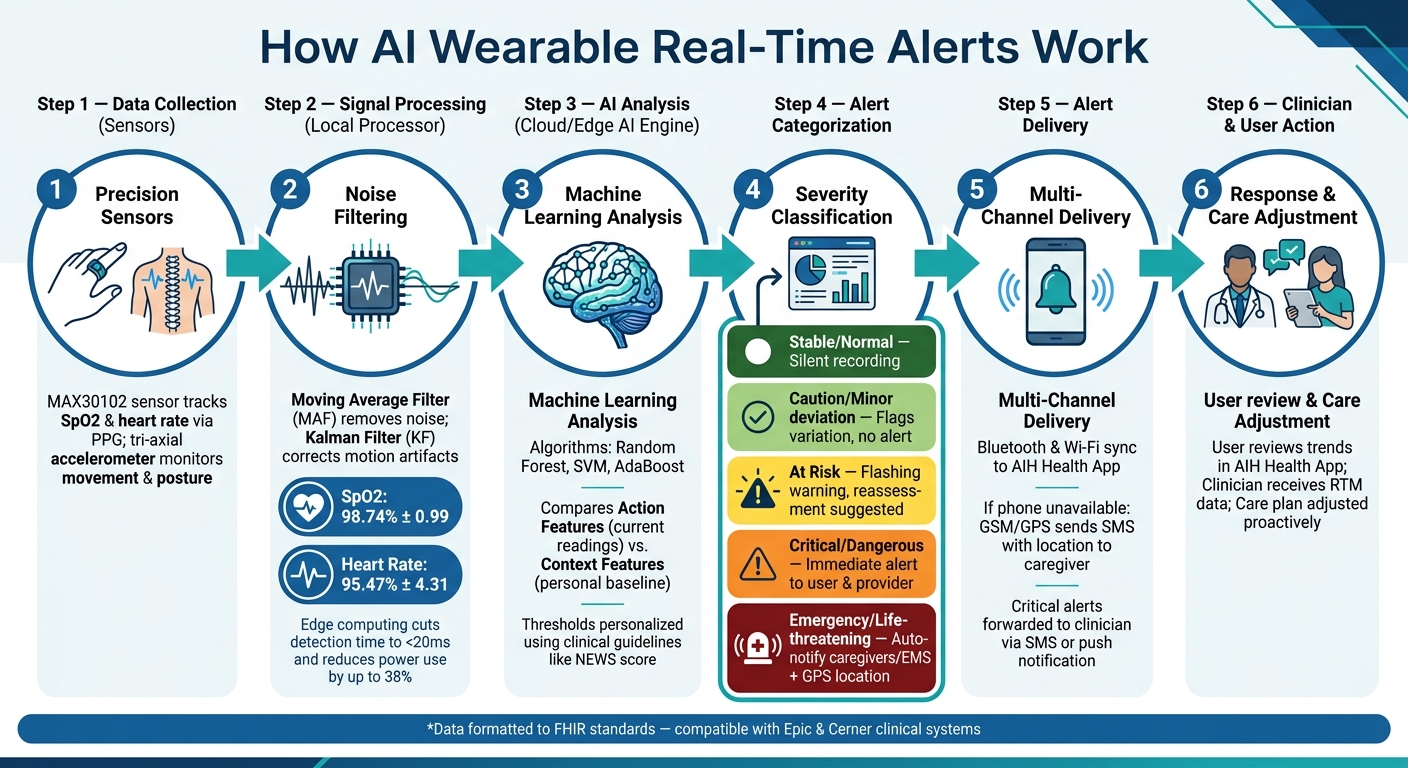
How AI Wearable Real-Time Alerts Work: From Body Signal to Notification
Understanding the process from your body signaling an issue to your phone buzzing with an alert can help build confidence in the system.
Core Components of an AI Wearable Alert System
An AI wearable alert system typically includes four main parts: device sensors, a local processor, a smartphone app, and a cloud-based AI engine. Here’s how it all works:
- Sensors: These track your physiological data continuously.
- Local Processor: It filters out noise and ensures only clean, relevant data gets transmitted.
- Smartphone App: Apps like the AIH Health App let you view readings and receive notifications.
- Cloud AI Engine: This layer handles advanced machine learning analysis and stores your long-term health records.
Some systems also use edge computing, which processes data directly on the wearable device instead of sending everything to the cloud. This method can cut detection times to under 20 milliseconds and reduce power use by up to 38% compared to cloud-only systems.
Data Collection and Signal Processing
The system starts with precision sensors that measure vital metrics. For example:
- A MAX30102 sensor uses photoplethysmography (PPG) to track heart rate and blood oxygen levels (SpO2).
- A tri-axial accelerometer monitors movement and posture.
Because raw sensor data is often messy – affected by motion, skin contact, or ambient conditions – devices use advanced filtering techniques. A Moving Average Filter (MAF) reduces noise, while a Kalman Filter (KF) corrects motion-related distortions. This combination achieves high accuracy: 98.74% ± 0.99 for SpO2 and 95.47% ± 4.31 for heart rate.
Once cleaned, the data feeds into AI models to assess whether an alert is necessary.
AI Models and Alert Thresholds
After processing, machine learning models analyze the data for patterns. Algorithms like Random Forest, Support Vector Machines (SVM), and AdaBoost help distinguish normal variations from potential health concerns. These models rely on two key data types:
- Action Features: Current readings.
- Context Features: Historical baselines built over time as you use the device.
Alert thresholds can follow clinical guidelines, such as the National Early Warning Score (NEWS), or be tailored to your unique baseline. Personalized thresholds are crucial because what’s normal for one person (like a 48 bpm resting heart rate for an athlete) might be alarming for someone else. Working with a healthcare provider to fine-tune these settings can significantly reduce false alarms.
How Alerts Are Generated and Delivered
When a reading surpasses a threshold, the system categorizes the event by severity and triggers the appropriate response. A color-coded system is often used:
| Alert Level | Clinical Significance | Action Taken |
|---|---|---|
| Dark Green | Stable/Normal | Silent recording; no action required |
| Light Green | Caution/Minor deviation | Flags minor variations without triggering an alert |
| Yellow | At Risk | Flashing warning; suggests reassessment |
| Orange | Critical/Dangerous | Immediate alert to user and healthcare provider |
| Dark Red | Emergency/Life-threatening | Automatic notifications to caregivers or EMS, including GPS location |
Data syncs in real time between the wearable and your phone using Bluetooth and Wi-Fi. If your phone isn’t nearby, GSM/GPS modules can send an SMS with your location to a caregiver or emergency contact. The AIH Health App ties it all together, showing alert history and forwarding critical notifications to your care team through its remote monitoring services.
How to Set Up Real-Time Alerts for Your Condition
Now that you know how the alert system works behind the scenes, let’s dive into getting it up and running for your specific condition.
Device and App Setup
To start, pair your devices with the AIH Health App. The aiRing monitors key metrics like heart rate variability (HRV), skin temperature, and sleep patterns, while the aiSpine focuses on posture, stride length, and mobility. Both devices connect via Bluetooth through the app’s device menu.
Once paired, complete your user profile. This includes entering details like your age, weight, diagnosed conditions, and any doctor-verified baselines (e.g., your resting heart rate). These inputs help the AI customize your thresholds. For the system to work effectively, it requires daily monitoring to establish your personal health baseline. This baseline ensures that alerts are meaningful and not just false alarms. To capture critical data like HRV and sleep patterns, wear both devices throughout the day and night.
After pairing and setting up your profile, adjust the metrics and alert thresholds to align with your health needs.
Configuring Metrics and Alert Thresholds
The AIH Health App allows you to select specific metrics based on your condition. Below is a breakdown of what each device tracks and how it contributes to the alert system:
| Metric Category | Specific Metrics | Device |
|---|---|---|
| Autonomic/Vitals | HRV, Heart Rate, Skin Temperature, Sleep Duration | aiRing |
| Mobility/Motor | Stride Length, Step Height, Swing Velocity, Cadence | aiSpine |
| Spine/Posture | Posture Alignment, Balance, Daily Activity Levels | aiSpine / aiRing |
Focus on weekly trends rather than day-to-day changes for a clearer picture of your health. The app also factors in environmental conditions, like high temperatures, to prevent unnecessary alerts caused by things like heat-related fatigue. The aiSpine adds another layer of support with real-time vibration alerts to help correct your posture throughout the day.
Additionally, participate in active assessment prompts, such as guided walks, to fine-tune the calibration of your gait and posture data.
Connecting With Clinicians and Remote Monitoring Services
To make the most of the alert system, share your data with your healthcare provider. AIH LLC offers a Remote Therapeutic Monitoring (RTM) service, which allows your clinician to review your trends and objective metrics between appointments (typically every 6 to 12 months). This continuous data stream enables proactive treatment adjustments, helping manage your condition more effectively.
On the technical side, your device data is formatted to meet FHIR (Fast Healthcare Interoperability Resources) standards, ensuring compatibility with clinical systems like Epic or Cerner. Critical alerts are sent immediately to your on-call clinician via SMS or push notifications, while routine data is compiled for daily review. Before your next visit, use the app’s trend reports as a summary – this is far more reliable than relying on memory to describe how you’ve been feeling over several months.
Using Real-Time Alerts in Day-to-Day Chronic Disease Management
Once your system is set up and your devices are connected to your clinician, the next step is integrating real-time alerts into your daily routine. This means not just receiving alerts but understanding how to interpret them and act accordingly to stay ahead in managing your condition.
Alert Types and Severity Levels
Not all alerts require the same level of urgency or action. The AIH system categorizes alerts into four distinct types, each tied to specific data sources and designed to prompt different responses:
| Alert Type | Data Source | User Action |
|---|---|---|
| Vibration Alert | aiSpine (accelerometers) | Correct your posture immediately to conserve energy |
| Smart Alert | aiRing / aiSpine (HRV, gait) | Check trends in the app; consult your clinician if significant changes persist |
| Active Assessment Reminder | AIH Health App | Complete the calibration task as prompted |
| Predictive Insight | AI algorithms (long-term data) | Adjust your care plan and monitor for potential symptom flares proactively |
By understanding these alert types, you can prioritize your responses and take the right action based on the urgency.
How to Respond to Alerts
Each alert type serves a specific purpose, and your response should match its intent:
- Vibration Alerts: These require immediate action. Adjust your posture right away to prevent strain and conserve energy.
- Smart Alerts: Use the app to review trend data. If you notice ongoing or significant changes, contact your clinician for guidance.
- Predictive Insights: These are early warnings, not emergencies. Use them to refine your care plan and stay alert for potential symptom changes in the coming days or weeks.
Acting promptly on these alerts not only addresses immediate concerns but also helps in making better long-term adjustments with your care team.
Working With Your Care Team Using Alert Data
The AIH Health App keeps a record of your alert history, which becomes a valuable tool for clinical discussions. Before your appointments, take time to review the past 30 days of alerts. Look for recurring patterns or anomalies that can provide insights into your condition. This information helps your care team fine-tune your treatment plan and ensures your care remains tailored to your needs.
Safety, Accuracy, and Limits of AI Alerts
Grasping both the strengths and limits of AI wearables is key to making the most of their role in managing chronic illnesses.
What AI Wearables Do Well
AI wearables shine when it comes to continuous, passive health monitoring. Unlike a single snapshot from a doctor’s visit, these devices track your vitals 24/7, capturing subtle changes that might otherwise slip through the cracks between appointments.
The accuracy of well-designed AI systems is impressive. Clinical studies show SpO2 accuracy at 98.74%, body temperature at 98.56%, and heart rate at 95.47%. For specific conditions, like atrial fibrillation, the results are just as strong, with sensitivity at 94.2% and specificity at 95.3%. These numbers translate into real-world benefits for those managing chronic conditions daily.
But even with these high levels of accuracy, errors can creep in during real-world usage.
Possible Sources of Error and How to Handle Them
In everyday situations, factors like motion artifacts, poor sensor contact, and environmental conditions can lead to inaccuracies.
A few simple habits can help reduce these errors. Make sure the device fits snugly against your skin; loose placement is one of the most common causes of inaccurate readings. Avoid excessive movement and give sensors 10–20 seconds to stabilize before relying on metrics like heart rate or SpO2. Environmental factors are also important – extreme temperatures outside 59–104°F (15–40°C) and conditions like diabetes that affect circulation can impact sensor performance.
If you get an unexpected reading, pause, rest, and double-check with a clinical-grade device before making any decisions.
When to Seek Medical Attention Beyond the Device
Remember, your wearable is a monitoring tool, not a diagnostic device. It’s there to support you, not replace professional medical judgment. Certain symptoms demand immediate attention, no matter what your wearable shows – or doesn’t show.
| Symptom | Action |
|---|---|
| Chest pain or pressure | Call 911 immediately |
| Sudden shortness of breath | Seek emergency care |
| Severe dizziness or fainting | Call 911 or go to the ER |
| Sudden numbness or weakness on one side | Call 911 – possible stroke |
| Readings that don’t match how you feel | Contact your clinician directly |
Above all, listen to your body. A wearable might miss a critical signal or misinterpret data due to its limitations. When something feels off, reach out to your healthcare provider or head to the nearest emergency room. These devices are tools to enhance your care, but they’re no substitute for professional medical advice.
Building a Long-Term Care Plan With AIH LLC Tools
Setting Long-Term Monitoring Goals
Real-time alerts are great for quick responses, but a long-term care plan is essential for managing your condition over time. Start by setting specific, long-term goals that align with your health needs. For example, if you’re dealing with a spine disorder, your targets might include improving posture, achieving balanced mobility, or maintaining a steady walking cadence. For those managing cardiovascular conditions, goals could focus on maintaining stable heart rate variability (HRV) and gradually improving sleep quality.
Collaborate with your clinician to define two or three measurable targets from the outset. These benchmarks not only guide your care but also help the AIH Health App’s trend reports track meaningful progress over weeks or months, providing a clearer picture beyond daily variations.
How AIH Devices and Services Work Together
AIH’s devices, the aiRing and aiSpine, are designed to work in harmony, addressing different but equally important aspects of chronic disease management.
| Feature | aiRing | aiSpine |
|---|---|---|
| Primary Focus | Autonomic health & vitals | Motor function & mobility |
| Key Metrics | HRV, heart rate, skin temp, sleep | Stride length, cadence, posture, balance |
| Feedback Type | App dashboard & smart alerts | Vibration alerts and dashboard |
| Clinical Use | Fatigue & energy tracking | Gait analysis & fall prevention |
These devices sync seamlessly with the AIH Health App, combining internal vital stats with external motor data. This integration provides a more comprehensive view of your health, enhancing the insights available during clinical consultations. These combined data points naturally inform and refine your care plan as time goes on.
Reviewing and Adjusting Your Care Plan Over Time
While daily data can fluctuate, weekly trends often reveal more reliable patterns in your health. Long-term tracking enables proactive care adjustments based on consistent, historical data rather than isolated snapshots. For example, if a smart alert identifies a significant change, it’s critical to contact your clinician immediately. AI tools can even predict potential symptom changes, allowing you to adapt your care plan ahead of time – helping you stay one step ahead of potential flare-ups instead of reacting after the fact.
FAQs
How long does it take to learn my normal baseline?
The system requires 7–14 days of continuous monitoring to determine your personalized baseline. During this period, the AI processes your physiological data to calculate a rolling average and standard deviation for your vital signs. Once this baseline is established, devices from AIH LLC, such as aiSpine and aiRing, can identify health anomalies with accuracy, delivering alerts customized to match your unique physiological patterns.
What should I do if I get an alert but feel fine?
If your AIH LLC wearable sends you an alert but you’re feeling fine, don’t panic. The device is designed to pick up on subtle changes in your body, often before any noticeable symptoms show up. Take the alert as a cue to review your recent activity, keep an eye out for any emerging symptoms, and check the guidance provided in the AIH Health App. Keep in mind, these alerts are meant to be proactive and not a sign of an emergency. However, if the alerts continue or you’re feeling uneasy, it’s always a good idea to reach out to your healthcare provider.
Will alerts still work if my phone isn’t nearby?
Yes, your alerts will still function. AIH LLC’s aiSpine and aiRing devices are designed with Edge AI technology, allowing them to process health data directly on the wearable itself. By focusing on local data processing and on-site emergency assessments, these devices don’t depend on continuous phone or cloud connections. For example, aiSpine provides vibration feedback to help correct posture, delivering alerts instantly through the device. This ensures uninterrupted monitoring, even when your phone isn’t nearby.